Controllers
aiofranka supports four control modes, each suited for different applications.
All modes work with Controller, and with NativeFrankaController, the same controller
for asyncio code, whose calls take an await. The legacy FrankaController and server
mode have them too.
Impedance Control
Joint-space impedance control implements a spring-damper system:
where:
\(\tau\): Joint torques [Nm]
\(K_{\text{p}}\): Position stiffness gains [Nm/rad] —
controller.kp\(K_{\text{d}}\): Damping gains [Nm·s/rad] —
controller.kd\(\mathbf{q}_{\text{desired}}\): Desired joint positions [rad] —
controller.q_desired\(\mathbf{q}\): Current joint positions [rad]
\(\dot{\mathbf{q}}\): Joint velocities [rad/s]
Torque rate limiting is applied when controller.clip = True (default).
Usage
controller.switch("impedance")
controller.kp = np.ones(7) * 80.0  # Stiffness
controller.kd = np.ones(7) * 4.0   # Damping
controller.set_freq(50)

for i in range(200):
    target = compute_target(i)
    controller.set("q_desired", target)  # await it with NativeFrankaController
Best for: Joint-space trajectories, compliant behavior, system identification.
Default gains: kp = 80, kd = 4 (per joint).
PID Control
Joint-space PID control with integral term for reducing steady-state error:
where \(\mathbf{e} = \mathbf{q}_{\text{desired}} - \mathbf{q}\).
The integral term is clamped (anti-windup) to prevent unbounded growth.
Integral state is reset when switching controllers via switch().
Usage
controller.switch("pid")
controller.kp = np.ones(7) * 80.0   # Proportional
controller.ki = np.ones(7) * 0.1    # Integral
controller.kd = np.ones(7) * 4.0    # Derivative (damping)
controller.set_freq(50)

for i in range(200):
    target = compute_target(i)
    controller.set("q_desired", target)
Best for: Tasks requiring zero steady-state error, precise positioning.
Default gains: kp = 80, ki = 0.1, kd = 4 (per joint).
Operational Space Control (OSC)
OSC controls the end-effector in Cartesian space while managing null-space behavior:
where:
\(\mathbf{J}\): End-effector Jacobian (6x7) —
state['jac']\(\mathbf{M}_{\mathbf{x}} = (\mathbf{J} \mathbf{M}^{-1} \mathbf{J}^T)^{-1}\): Operational space inertia matrix
\(\mathbf{M}\): Joint-space mass matrix (7x7) —
state['mm']\(\mathbf{e} = [\mathbf{p}_{\text{goal}} - \mathbf{p}; \text{Log}(\mathbf{R}_{\text{goal}} \mathbf{R}^{-1})]\): Pose error (position + rotation as axis-angle)
\(\dot{\mathbf{x}} = \mathbf{J} \dot{\mathbf{q}}\): End-effector velocity
\(\bar{\mathbf{J}} = \mathbf{M}^{-1} \mathbf{J}^T \mathbf{M}_{\mathbf{x}}\): Dynamically consistent pseudoinverse
\((\mathbf{I} - \mathbf{J}^T \bar{\mathbf{J}}^T)\): Null-space projection matrix
\(\mathbf{q}_0\): Null-space reference configuration (
controller.initial_qpos)
Usage
controller.switch("osc")

# Task-space gains [x, y, z, roll, pitch, yaw]
controller.ee_kp = np.array([300, 300, 300, 1000, 1000, 1000])
controller.ee_kd = np.ones(6) * 10.0

# Null-space gains (keeps robot away from joint limits)
controller.null_kp = np.ones(7) * 10.0
controller.null_kd = np.ones(7) * 1.0

controller.set_freq(50)

# Create desired pose (4x4 homogeneous transform)
desired_ee = np.eye(4)
desired_ee[:3, :3] = rotation_matrix  # 3x3 rotation
desired_ee[:3, 3] = [x, y, z]         # position

controller.set("ee_desired", desired_ee)
End-Effector Pose Format
The end-effector pose is a 4x4 homogeneous transformation matrix:
ee = [[R | p],
      [0 | 1]]

# R: 3x3 rotation matrix (SO(3))
# p: 3x1 position vector [x, y, z] in meters
Example with scipy:
from scipy.spatial.transform import Rotation as R

ee = np.eye(4)
ee[:3, :3] = R.from_euler('xyz', [180, 0, 0], degrees=True).as_matrix()
ee[:3, 3] = [0.5, 0.0, 0.4]  # meters
Tool Center Point
By default, the OSC controls the flange. To control a point on the tool instead, e.g. the fingertips, set the tool center point (TCP) as a pose in the flange frame:
controller.switch("osc")
controller.set_tcp([0, 0, 0.1034])     # a translation, here the Franka Hand fingertips

tcp = np.eye(4)                        # or a 4x4 pose, also rotating the controlled frame
tcp[:3, :3] = R.from_euler('z', -45, degrees=True).as_matrix()
tcp[:3, 3] = [0, 0, 0.1034]
controller.set_tcp(tcp)
From then on, ee_desired is the pose of the TCP in the base frame. set_tcp() sets it to the
TCP’s current pose, so the arm holds still, and the TCP stays in effect when you switch controllers.
The TCP of the end-effector profile in Desk is not used.
The flange frame has its origin at the center of the flange face and its z-axis pointing out of the flange; the box on the side of link 7 points between +x and +y. Here it is at the home pose, with x red, y green and z blue, and on the right a TCP 10 cm along z:
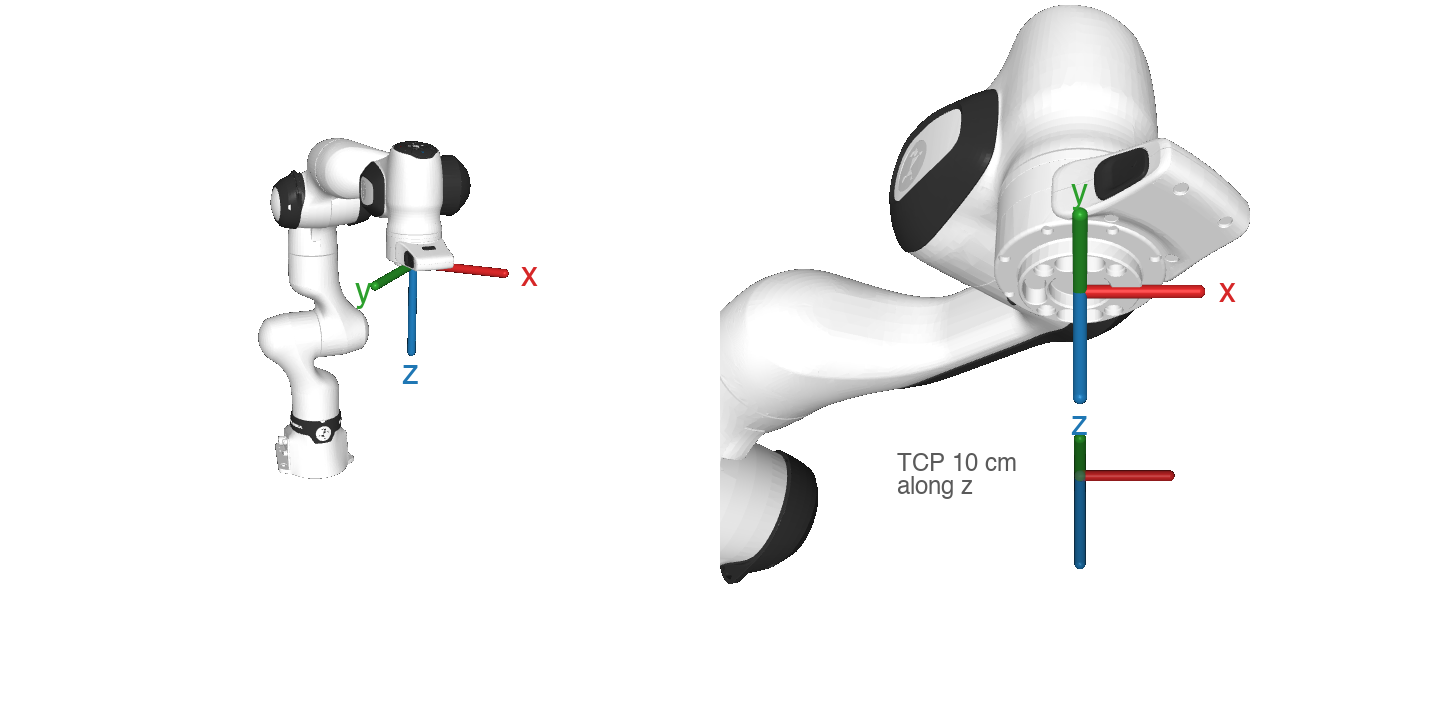
The frame is the attachment_site of the MuJoCo model, which robot.state["ee"] reports.
Best for: Cartesian motions, end-effector tracking, teleoperation.
Default gains: ee_kp = 100, ee_kd = 4 (all 6 axes); null_kp = 1, null_kd = 1 (per joint).
Direct Torque Control
Send raw torque commands directly. You are responsible for computing the full torque vector.
Usage
controller.switch("torque")

# Your custom control law
state = controller.state
q = state['qpos']
dq = state['qvel']

kp = np.ones(7) * 60.0
kd = np.ones(7) * 3.0
target = controller.initial_qpos

tau = kp * (target - q) - kd * dq
controller.torque = tau
Warning
Direct torque control bypasses all built-in safety checks except torque rate limiting. Test in simulation first!
Best for: Custom control laws, gravity compensation, research.
Switching Controllers
You can switch between controllers at runtime:
# Start with impedance
controller.switch("impedance")
controller.kp = np.ones(7) * 80.0
controller.set("q_desired", target1)

# Switch to OSC
controller.switch("osc")
controller.ee_kp = np.array([300, 300, 300, 1000, 1000, 1000])
controller.set("ee_desired", target2)

# Switch to PID
controller.switch("pid")
controller.ki = np.ones(7) * 0.5

# Switch to direct torque
controller.switch("torque")
controller.torque = np.zeros(7)
Note
Switching resets initial states (initial_qpos, initial_ee), clears rate-limiting timing, and resets the PID integral term.
Controller Configuration Files
A YAML file can hold everything about how a policy drives the robot: the mode, its gains, the
policy rate and the tool it is for. activate() applies it in place of switch(), the gains
and set_freq():
# configs/osc.yaml
mode: osc
tool: none                 # Desk end-effector profile it needs; none is "No End Effector"
ee_kp: 100                 # x, y, z, then rotation [1/s^2]: one value, or 6
ee_kd: 20
null_kp: 9                 # one value, or one per joint (default 1)
null_kd: 6                 # (default 1)
tcp: [0, 0, 0]             # TCP in the flange frame: a translation [m] or a 4x4 pose
frequency: 50              # policy rate [Hz]
controller.activate("configs/osc.yaml")
# the same as
controller.set_tcp([0, 0, 0])
controller.switch("osc")
controller.ee_kp, controller.ee_kd = np.ones(6) * 100.0, np.ones(6) * 20.0
controller.null_kp, controller.null_kd = np.ones(7) * 9.0, np.ones(7) * 6.0
controller.set_freq(50)
Without a null_target, the null space keeps the joint positions at activation, as switch()
does, so activating moves nothing. A policy trained with a fixed posture names it, as 7 joint
positions or home. Then activate() only applies the configuration with the arm already
there, every joint within controller.arrival_tolerance (0.03 rad), the same criterion
move() stops at; otherwise the null space would swing the arm toward the target at once (in
MuJoCo, a configuration whose target was 1.6 rad away swung joint 1 at 4.6 rad/s). Move there
first:
config = aiofranka.load_config("configs/pocky/lv1_osc.yaml")
controller.move(config["null_target"])  # also puts the TCP where the policy starts
controller.activate(config)
A joint impedance file has mode: impedance, kp and kd. The configs/ folder of the
repository has examples. aiofranka.load_config() reads and checks a file; unknown keys are an
error, so a typo cannot pass silently.
activate() refuses a configuration whose tool is not the end-effector profile active in
Desk. RobotInterface reads the active profile when it connects, with the Desk credentials saved by
aiofranka, because a request to Desk during control would stall the 1 kHz loop; after changing
the profile, reconnect. If Desk cannot be read, activate() refuses too; pass
check_tool=False to skip the check (the system identification collectors: --no-check-tool). In
MuJoCo there is no Desk and nothing is checked. RobotInterface(ip, read_tool=False) does not read
Desk; the server does not.
The system identification examples collect with a configuration (--activate), list each
complete recording from the robot in its recordings section, fit the latest by default, and add
what they fit to its sim section, one entry per physics step: the gains and joint parameters with which a
simulation that runs the controller every physics step responds as the robot did, with the payload
the fit assumed (merged into fr3_link7 by aiofranka.robot.merge_payload()) and where the
data came from (plant: robot or mujoco). Read one with
aiofranka.config.sim_entry(config, physics_dt). While the control loop runs, pass
activate() a configuration read before with load_config(): reading a file takes a few
milliseconds.
Trajectory Motion
The move() method generates a smooth, time-optimal, jerk-limited trajectory using Ruckig and executes it automatically:
# Move to home position
controller.move()

# Move to custom position
controller.move([0, -0.785, 0, -2.356, 0, 1.571, 0.785])
With NativeFrankaController, await controller.move(...).
move() temporarily switches to impedance control. Trajectory limits are:
Max velocity: 10 rad/s per joint
Max acceleration: 5 rad/s per joint squared
Max jerk: 1 rad/s per joint cubed
Payload Identification
The robot compensates the gravity of the arm and of the tool on the flange, as configured by the
active end-effector profile in Desk (Settings > End Effector). RobotInterface merges the profile
into the MuJoCo model when it connects, so the mass matrix used by the OSC includes it too. If the
profile does not match the tool, the arm drifts in torque control, e.g. with zero torques.
identify_payload() measures the mass and center of mass of the tool, starting from any profile,
e.g. “No End Effector”. Save the result as a profile and activate it:
import aiofranka

controller = aiofranka.Controller(aiofranka.Robot("172.16.0.2"))
estimate = controller.identify_payload(tool_length=0.25)   # moves the robot
aiofranka.save_tool("gripper", estimate.mass, estimate.com)       # create or update the profile
aiofranka.load_tool("gripper")                                     # activate it
It plans the poses around the current one first. Planning computes for a few tenths of a second, and the robot aborts the motion when the 1 kHz control loop stalls that long, so a running controller is stopped while planning, with the robot holding still, and started again; one that was not started is started for the identification and stopped afterwards.
Or from the CLI, which does all of this: aiofranka tool identify gripper (see CLI Reference).
list_tools() and remove_tool() list and delete profiles. Desk keeps the profiles and the
active one across reboots, and the web UI shows them too.
identify_payload() moves through 16 poses around the current one, in which the flange points in
different directions, and measures the joint torques at rest that the robot does not compensate.
Part of the joint friction acts past the torque sensors, so at rest they also see part of the torque
with which the controller holds each joint against stiction: on an FR3, a few tenths of a Nm that
flips sign with the side the joint came from. So it approaches each pose from both sides, 0.08 rad
away, and averages. The torques are linear in the mass and first moment of the tool, which least
squares fits together with a torque offset per joint. It takes about 3 minutes.
estimate has the mass and the center of mass in the flange frame with their standard errors, and
the RMS of the residual torques per joint before and after. Running it again with the new profile
active checks the result: the correction should be close to zero.
The precision depends on the torque noise. With the 16 planned poses, the standard error of the mass
is about 9 g per 0.05 Nm of residual torque noise, and that of the first moment mass * com about
1 g·m. The center of mass is therefore good to about 1 mm for a 1 kg tool, but only to about 1 cm
for a 100 g one, so light tools are better weighed. Twice the poses gains only a factor of √2. Check
estimate.mass_std and estimate.com_std before using the result.
Note
The inertia does not change the gravity torques, so it cannot be identified at rest.
save_tool()keeps a profile’s inertia, and gives a new one that of a 5 cm solid sphere, since the robot rejects a mass without inertia. Passinertiato set it.save_tool()keeps a profile’s tool center point unless you passtranslationandrotation.Activating a profile needs the control token: aiofranka uses the one
aiofranka unlocksaved, or takes it for the call. Programs connected to the robot pick up a new profile when they reconnect.robot.set_load()adds a load on top of the profile for one connection;RobotInterfaceresets it when it connects.
Warning
The planned poses are only checked for collisions of the arm, a cylinder around the tool
(tool_length=0.2, tool_radius=0.1 m by default) and the floor (floor=0.0 m, the
mounting plane, by default), from which the arm and tool keep 5 cm. Start in an open pose,
keep other obstacles out of reach, and stay close to the e-stop.
Safety Features
Torque Rate Limiting
By default (controller.clip = True), torque commands are rate-limited to prevent safety triggers:
controller.clip = True                # Enable rate limiting (default)
controller.torque_diff_limit = 990.0  # Max torque rate [Nm/s]
controller.torque_limit = np.array([87, 87, 87, 87, 12, 12, 12])  # Absolute limits [Nm]
Gain Tuning Tips
Start with low gains and increase gradually
Higher
kp= stiffer tracking, but can cause oscillationHigher
kd= more damping, reduces oscillation but slows responseFor OSC, position gains (first 3) and orientation gains (last 3) can be tuned independently
Always test new gains with small motions first